Lenovo ThinkPad X390 Core i5 8th Gen 16GB RAM 256GB SSD Specifications and Price in Kenya
Lenovo ThinkPad X390 Core i5 8th Gen 16GB RAM 256GB SSD price in Nairobi Kenya is 35,000ksh at Modiohubkenya The Lenovo ThinkPad X390 emerges as a strong contender in the competitive landscape of business laptops, specifically designed to cater to the rigorous demands of professionals who prioritize mobility, durability, and performance. With an increasing number of individuals working remotely or in transit, the need for a reliable and efficient laptop has never been more critical. The ThinkPad X390 addresses this need with its lightweight design, allowing users to easily carry it throughout the day without unnecessary strain.
Portability is a key factor for business professionals who often transition between meetings, conferences, or even travel. Weighing approximately 2.8 pounds and boasting a slim profile, the X390 strikes a balance between form and function, making it an ideal travel companion. Furthermore, its impressive battery life ensures that users can rely on it during long working hours or while away from power sources, thus reinforcing its role as a dependable tool for productivity.
Durability is another pivotal aspect, particularly for those in corporate environments where laptops may face various stresses. The Lenovo ThinkPad X390 features a robust build that meets military-grade testing standards, safeguarding it against drops, spills, and everyday wear and tear. This resilience is integral for professionals who may find themselves in places where laptop safety cannot be guaranteed.
Finally, performance is non-negotiable in the realm of business laptops. The X390 is equipped with powerful processors, ample RAM, and fast storage options that enable seamless multitasking and rapid data retrieval. This capacity to handle demanding tasks is crucial for users who rely on their laptops for intensive applications, data analysis, or creative work. Thus, the Lenovo ThinkPad X390 stands out as a well-rounded solution, tailored for today’s mobile workforce.
Design and Build Quality
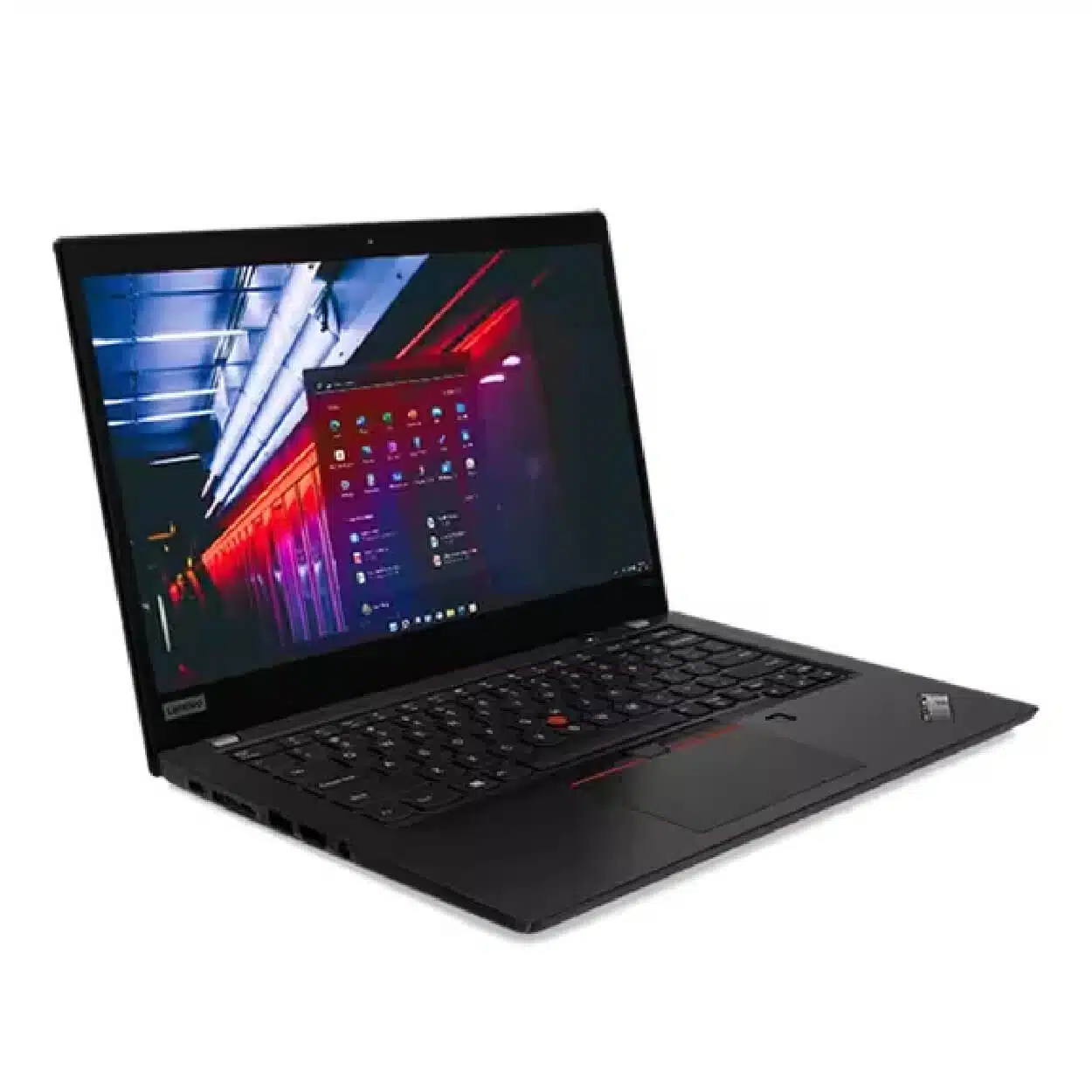
The Lenovo ThinkPad X390 exemplifies a blend of modern aesthetics and robust functionality tailored for professionals. This laptop boasts compact dimensions, measuring 12.4 x 8.5 x 0.6 inches, which makes it exceedingly portable and convenient for business travel. Weighing in at approximately 2.8 pounds, the X390 is lightweight, allowing users to easily transport it without sacrificing performance or features.
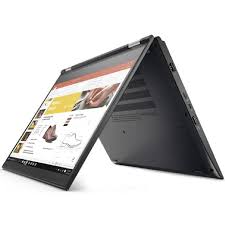
In terms of design, the ThinkPad X390 retains the classic ThinkPad look, characterized by its sleek black finish and minimalist design elements. The matte exterior not only enhances the laptop’s professional appeal but also helps to reduce fingerprints and smudges, ensuring it remains pristine throughout various business engagements. The signature red TrackPoint, coupled with ergonomic features, promotes an intuitive user experience suitable for long working hours.
The materials used in the construction of the X390 reflect Lenovo’s commitment to durability. The laptop’s chassis is comprised of high-quality magnesium and carbon fiber, contributing to its overall sturdiness while remaining lightweight. This robustness is essential for professionals who frequently work in varying environments. Additionally, the ThinkPad X390 is tested against military-grade specifications, which assesses its resilience to extremes in temperature, humidity, and altitude. Such rigorous testing further establishes its reliability as a device designed for intensive usage.
Another noteworthy aspect of the X390’s build quality is its spill-resistant keyboard, which is a crucial feature for professionals who may encounter accidental spills. This attention to detail in design ensures that the device can endure the demands of a busy workday while maintaining functionality.
In summary, the Lenovo ThinkPad X390 stands out in the business laptop market, offering a combination of a professional design, portable weight, and durable materials, making it an optimal choice for users who value functionality and style in their technology.
Display Features
The Lenovo ThinkPad X390 is equipped with a 13.3-inch display, which strikes an ideal balance between portability and usability. The Full HD resolution of 1920 x 1080 pixels ensures that users experience sharp and detailed visuals, making it suitable for various professional tasks, including presentations and document review. This high resolution contributes to an overall enhanced user experience, particularly for individuals who engage in graphic work or require meticulous attention to detail.
One of the standout features of the ThinkPad X390 is its brightness level, which reaches up to 400 nits. This high brightness capability allows the screen to remain legible even in brightly lit environments, such as outdoor settings or well-lit conference rooms. The ability to work effectively in diverse lighting conditions enhances productivity and supports professionals who may need to present their work in various scenarios.
When it comes to color accuracy, the ThinkPad X390 does not disappoint. It covers a wide color gamut, making it suitable for graphic designers and those who require precise color representation in their projects. The vibrant colors and sharp contrast ratios improve image quality and make visual content more engaging. Viewing angles are equally impressive, with minimal color distortion when the screen is viewed from different perspectives. This feature is particularly beneficial during collaborative efforts, where multiple individuals may need to view the screen simultaneously.
Overall, the combination of an appropriately sized display, excellent resolution, high brightness levels, and accurate color representation, along with good viewing angles, elevates the Lenovo ThinkPad X390’s performance. These display features significantly contribute to a seamless and enjoyable user experience, enabling professionals to work efficiently and effectively.
Performance Specifications
The Lenovo ThinkPad X390 is equipped with robust internal components designed to cater to the demanding needs of professionals. At the heart of this laptop is the Intel Core i5 8th generation processor. This processor is known for its efficiency and strong performance capabilities, enabling users to execute complex tasks with ease. The four cores, along with Intel’s Turbo Boost technology, provide the ability to manage multiple applications simultaneously without lag, a critical feature for professionals who rely on multitasking for improved productivity.
Complementing the processor is a substantial 16GB of RAM, which significantly enhances the device’s capability to handle various tasks concurrently. With this ample memory, users can run resource-intensive software, such as data analytics tools or design applications, while maintaining system responsiveness. This RAM specification ensures that users can open numerous browser tabs, switch between applications seamlessly, and carry out large data processing tasks without encountering slowdowns.
Additionally, the inclusion of a 256GB Solid State Drive (SSD) plays a vital role in performance enhancement. SSDs are renowned for their speed advantages over traditional hard drives, allowing for rapid boot times and swift access to stored files and applications. This improved storage solution ensures that professionals working on the ThinkPad X390 experience quick file retrieval and reduced wait times, which is particularly beneficial in high-pressure environments. Together, these specifications optimize the overall performance of the ThinkPad X390, making it an excellent choice for professionals who require a reliable and powerful laptop to facilitate their work.
Battery Life and Portability
The Lenovo ThinkPad X390 shines in terms of battery life and portability, making it an ideal companion for professionals on the go. Under typical business usage, which often includes word processing, web browsing, and video conferencing, users can expect the battery to last approximately 12 to 14 hours. This extensive battery performance is particularly beneficial for those who frequently travel, as it alleviates the need for constant access to a power outlet throughout the day.
Another aspect of the X390’s design that enhances its portability is its lightweight chassis. Weighing around 2.8 pounds, it is one of the lighter models in the ThinkPad lineup, which facilitates ease of transportation in a laptop bag or briefcase. This blend of battery efficiency and a sleek profile ensures that professionals can work efficiently without being burdened by heavy equipment. The lightweight design not only contributes to increased mobility but also enhances the user’s overall experience during commuting or business trips.
Moreover, the battery life significantly affects workflow continuity and productivity. Professionals relying on the X390 will appreciate the ability to traverse long hours of meetings or travel without being tied down by charging cables. Furthermore, the innovative power-saving features integrated into the device allow users to maximize battery longevity without sacrificing performance. The energy-efficient display and optimized performance settings ensure that you can depend on this laptop for crucial tasks throughout your workday.
In conclusion, the Lenovo ThinkPad X390 provides excellent battery life and portability, making it a strong choice for business professionals. Its lightweight design combined with robust power-saving features allows users to remain productive during extensive usage in various environments.
Keyboard and Touchpad Experience
The Lenovo ThinkPad X390 is widely recognized for its exceptional keyboard layout and touchpad experience, which significantly contribute to the user’s overall productivity. The keyboard features the classic ThinkPad configuration, offering a well-spaced layout that ensures keys are easy to locate and press. With a travel distance of about 1.8mm, the key feedback is tactile and satisfying, making typing comfortable over extended sessions. Many professionals will appreciate the slight concavity of the keys, which helps to reduce typing fatigue and enhance accuracy. Moreover, the keyboard is spill-resistant, adding an element of durability that is crucial for users who are often on the go.
In addition to its robust keyboard, the ThinkPad X390 is equipped with a precision touchpad that complements the keyboard perfectly. The touchpad sensitivity is impressive, allowing for smooth navigation and seamless scrolling. Users can expect responsive touch controls, making tasks such as document editing and web browsing efficient. The touchpad also comes with gesture support, which enables convenient commands such as pinch-to-zoom and three-finger swipe, facilitating multitasking capabilities. This integration of gesture controls is particularly beneficial for professionals who utilize various applications simultaneously.
Considering the overall user experience, both the keyboard and touchpad of the ThinkPad X390 excel in providing reliability and comfort. The thoughtful design elements address the needs of professionals who may spend long hours on their laptops, ensuring that both typing and navigation are executed with precision and ease. Ultimately, the keyboard and touchpad combination enhances productivity, making the ThinkPad X390 a compelling choice for those in search of a powerful laptop that does not compromise on usability.
Connectivity and Ports
The Lenovo ThinkPad X390 is designed with a variety of connectivity options that specifically cater to the needs of professional users. This laptop features multiple ports that enhance its versatility and compatibility with a range of devices. The port selection includes two USB 3.1 Type-A ports, two USB Type-C ports, one HDMI output, a headphone/microphone combo jack, and a Smart Card reader. This comprehensive port array ensures that users can easily connect to peripherals such as external displays, storage devices, and audio equipment without needing multiple adapters.
The inclusion of two USB Type-C ports is particularly noteworthy. These ports support Power Delivery and data transfer, allowing users to charge the device or connect it to high-speed accessories. This modern connectivity standard is essential for business professionals who often rely on external devices for enhanced productivity. The USB Type-C ports ensure that the ThinkPad X390 remains compatible with the latest technology trends, thereby offering long-term usability.
Another vital aspect of the ThinkPad X390’s connectivity is the HDMI output, which allows users to easily connect the laptop to external monitors or projectors. This feature is invaluable in business presentations or collaborative meetings, where sharing visual information is crucial. The availability of a headphone/microphone combo jack further supports effective communication during virtual meetings.
Overall, the connectivity and port options available on the Lenovo ThinkPad X390 are thoughtfully designed to meet the demands of professional users. This combination of ports not only enhances device compatibility but also improves productivity by ensuring that users can connect a variety of devices seamlessly. The combination of these features solidifies the ThinkPad X390 as a preferred choice for business professionals seeking a reliable and powerful laptop.
Security Features
The Lenovo ThinkPad X390 integrates a range of robust security features designed specifically for business professionals who prioritize data security and privacy. One of the most notable elements is the inclusion of a fingerprint reader, which employs biometric authentication to ensure that only authorized users can access the device. This feature not only enhances security but also streamlines the login process, facilitating efficient work, especially in a fast-paced professional environment.
Additionally, the X390 is equipped with a physical webcam shutter. This essential feature allows users to cover the camera when it is not in use, thereby protecting against potential unauthorized access. Given the increasing frequency of cyber-attacks and privacy invasions, having a tangible solution for webcam privacy adds an important layer of security for business users, allowing them to work with peace of mind.
Furthermore, the laptop incorporates hardware-based security elements, including the Trusted Platform Module (TPM). This security chip plays a critical role in safeguarding sensitive data by providing encryption for files and passwords. The TPM functionality is vital for professionals who handle confidential information, ensuring that valuable data remains protected against unauthorized access and breaches.
The operating system’s suite of security features, such as Windows Hello compatibility and BitLocker encryption, complements the hardware security options, fostering a comprehensive security ecosystem. For business users, these features are not just technical specifications; they represent a commitment to safeguarding sensitive information and personal data against ever-evolving threats posed by cybercriminals.
In conclusion, the security features of the Lenovo ThinkPad X390, including the fingerprint reader, webcam shutter, and hardware security components, are vital for professionals who need to prioritize data protection and privacy in their daily operations. These functionalities collectively enhance user confidence while promoting a secure working environment.
Conclusion and Final Thoughts
In summary, the Lenovo ThinkPad X390 emerges as a commendable option for professionals seeking a reliable and powerful laptop. Throughout our review, several key attributes have been highlighted that contribute to its overall performance, design, and usability. The device is equipped with potent Intel processors, ensuring swift multitasking capabilities that cater to demanding work environments. Coupled with ample RAM and storage options, the X390 enables users to handle resource-intensive applications and manage projects with ease.
The design of the Lenovo ThinkPad X390 warrants attention as well. It showcases a robust construction that reflects Lenovo’s commitment to durability and reliability. The lightweight chassis, paired with a sleek and professional aesthetic, allows for easy portability, making it suitable for professionals on the move. The high-resolution display, with its deep color saturation and sharp details, enhances the visual experience, which is essential for presentations or content creation.
Usability is another strong point of the Lenovo ThinkPad X390. The keyboard design offers excellent tactile feedback, essential for long typing sessions, while the touchpad and TrackPoint feature enhance navigation. Battery life also stands as a significant advantage, with the device capable of lasting through the workday, reducing the need for frequent charging. Whether you are a business executive, a creative professional, or an IT specialist, the X390 accommodates a variety of professional needs effectively.
Considering its performance, design, and versatility, the Lenovo ThinkPad X390 offers good value for its price. While there are alternatives available in the market, this laptop equips professionals with the essential tools necessary for productivity. Therefore, for those in search of a powerful and dependable device, the X390 remains a strong contender worth considering.
How to Get Yours
1️⃣ Call/WhatsApp: 0729 222322 for expert advice
2️⃣ Test Drive: Visit our Nairobi showroom
3️⃣ Nationwide Delivery: Next-day via G4S or Courier Services










Reviews
There are no reviews yet.